Your Programs Are Not Single-Threaded
Other languages: Español Français Deutsch 日本語 한국어 Português 中文
When writing code, we tend to think synchronously. We write one statement after another, and the runtime executes them in order. This mental model works great for scripts and command-line tools, but it can be dangerously misleading when working with frameworks and server applications.
Even if you never explicitly create threads or use concurrency primitives, your web application is almost certainly running code in parallel. The framework handles it for you, which is convenient, as long as you keep that in mind and correctly use the threading model and the building blocks that the framework provides.

In this article, we’ll look at exactly the kind of bug that might happen when one mistakenly follows a single-threaded mental model in seemingly synchronous code. We’ll find the cause, reproduce it using the debugger, and look at several possible solutions.
The problem
Imagine you have a Spring Boot application that has been running fine in development and production. For a long time, everything has been working smoothly, but then the accounting team reports a serious issue: several invoices have the same number. This is bad. Invoice numbers must be unique for legal and accounting reasons. The duplicates only appeared once, and you can’t reproduce the issue locally.

To make this exercise more interesting, you can try to find the issue yourself before reading further. The project is available on GitHub.
You check the database, and it shows distinct records with identical invoice numbers. The configuration looks fine, yet something is clearly wrong. By tracing the invoice creation flow, you find the service responsible for generating invoice numbers.
Here’s what the code looks like:
@Service
public class InvoiceService {
    private InvoiceNumberGenerator generator;

    public Invoice createInvoice(Order order) {
        if (generator == null) {
            generator = createGenerator();
        }
        String invoiceNumber = generator.nextNumber();
        return new Invoice(invoiceNumber, order);
    }

    private InvoiceNumberGenerator createGenerator() {
        // Reads last used number from database, initializes counter
        int lastNumber = invoiceRepository.findMaxInvoiceNumber();
        return new InvoiceNumberGenerator(lastNumber);
    }
}
This is not how you’d write that code. Can you spot the problem?
What went wrong?
The mental model of the author probably was: “Spring manages my beans, so I’m safe.”
And that’s true: Spring indeed handles the bean lifecycle and ensures
that InvoiceService is created once and shared properly.
But Spring doesn’t know about fields you initialize yourself.
The generator field is your responsibility, and this is where the problem lurks.
The sequence of events
Spring beans are singletons by default.
This means there’s only one instance of InvoiceService shared across all requests.
When multiple HTTP requests come in simultaneously,
they’re handled by different threads, all accessing the same service instance.
Now, let’s trace through what happens if the generator hasn’t been initialized yet,
and two threads call createInvoice() at roughly the same time:
- Thread A checks
generator == null, which istrue - Thread A enters the
ifblock and starts creating the generator - Thread B checks
generator == null, which is stilltrue(A hasn’t created the generator yet) - Thread B also enters the
ifblock - Both threads query the database for
findMaxInvoiceNumber()and get the same value, for example,1000 - Both threads create their own
InvoiceNumberGeneratorstarting at1000 - Both call
nextNumber()and get1001 - Two invoices are created with the same number
The lazy initialization isn’t thread-safe, and under concurrent access, both threads might read the same “last invoice number” from the database and generate the same next number.
Reproducing with the debugger
The problematic code we just found is simple, so you might understand the sequence of events by just looking at it. In more complex cases, you might want to reproduce the bug step-by-step to understand exactly what’s happening. Other times, you might just want to simulate the unlucky timing and test if the program doesn’t break under load.
We’ll use the IntelliJ IDEA’s debugger for this. It can control individual threads – exactly what we need.
First, set a breakpoint at the generator = createGenerator(); line,
right-click it, and set Suspend
to Thread.
What this does is tell the debugger to only suspend the thread that hit the breakpoint rather than all of them.

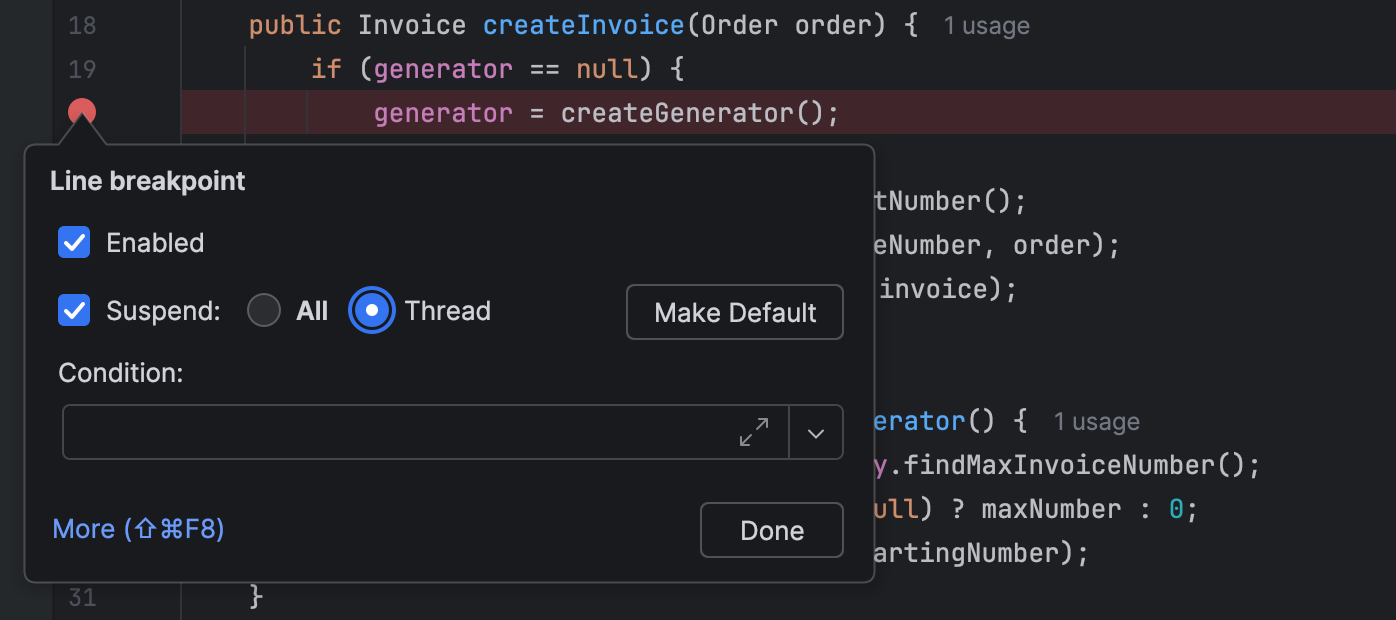
Run the application in debug mode and send two requests from different terminals using the following curl command:
curl -X POST http://localhost:8080/api/diagnostics/create-orderOne of the requests will hit the breakpoint: this is expected. When the second request also hits the breakpoint, you’ve just proven that multiple threads can enter the critical section simultaneously – the definition of the bug at hand.
You can inspect the Threads tab to see both threads waiting at the same location:
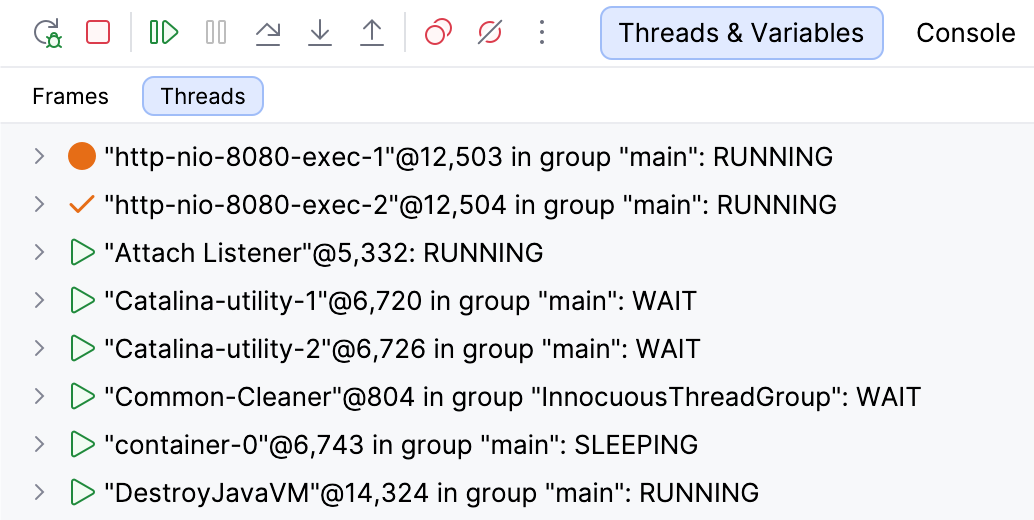
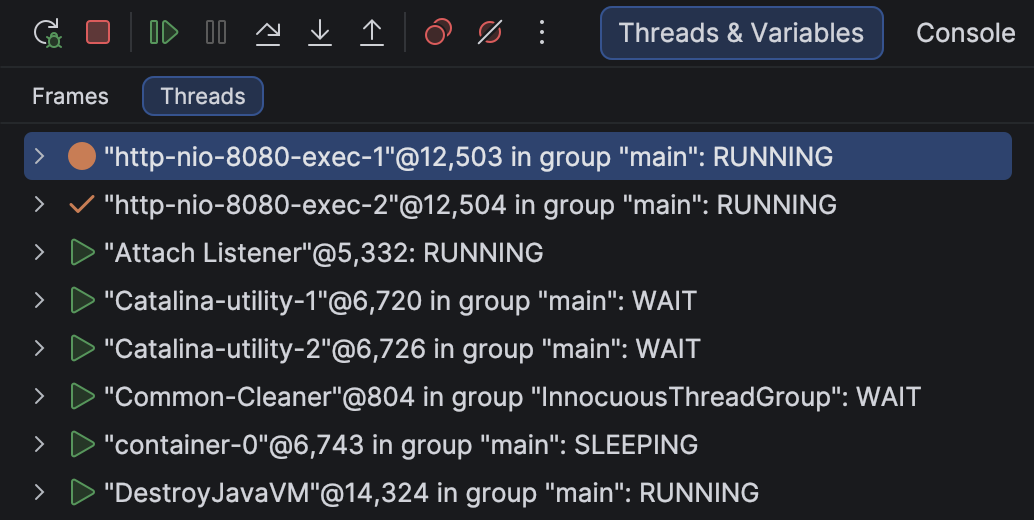
Both threads have passed the null check,
and when you release them, they will create their own generator instances.
Alternatively, you can use a non-suspending logging breakpoint with a small delay to simulate slower execution:
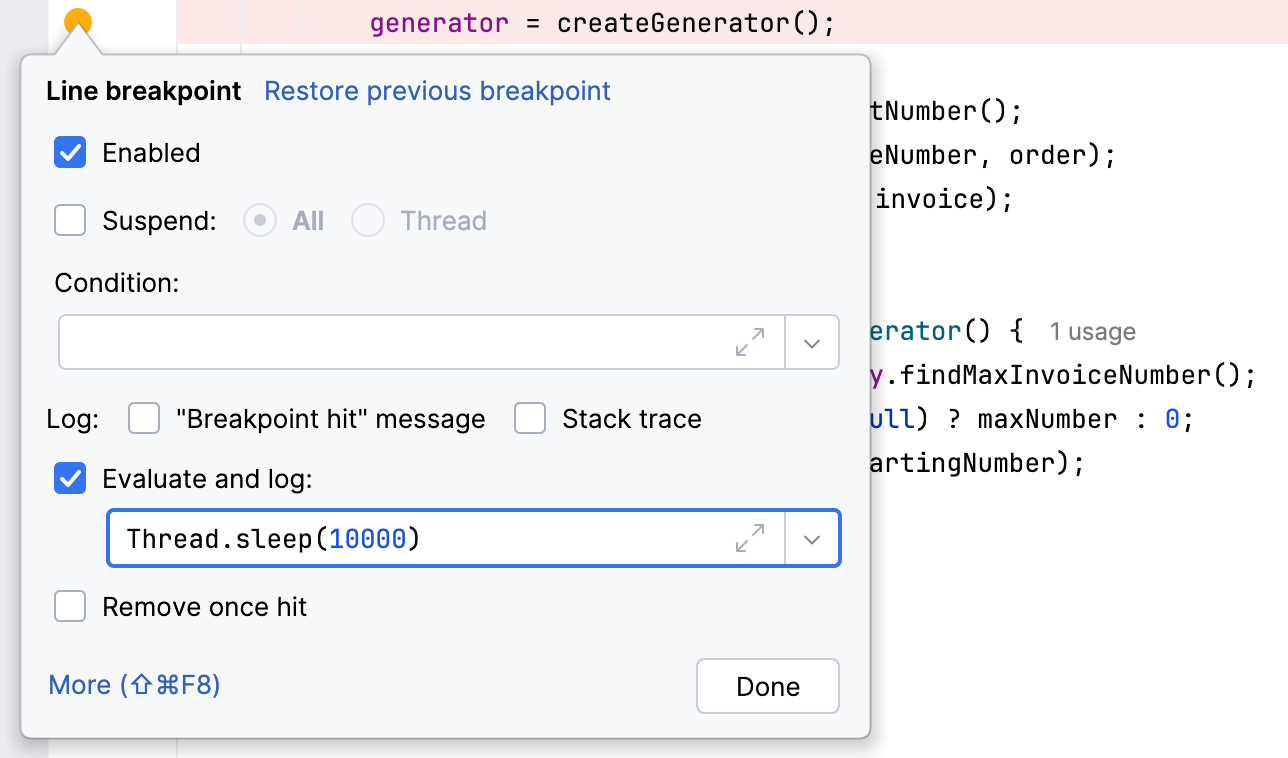
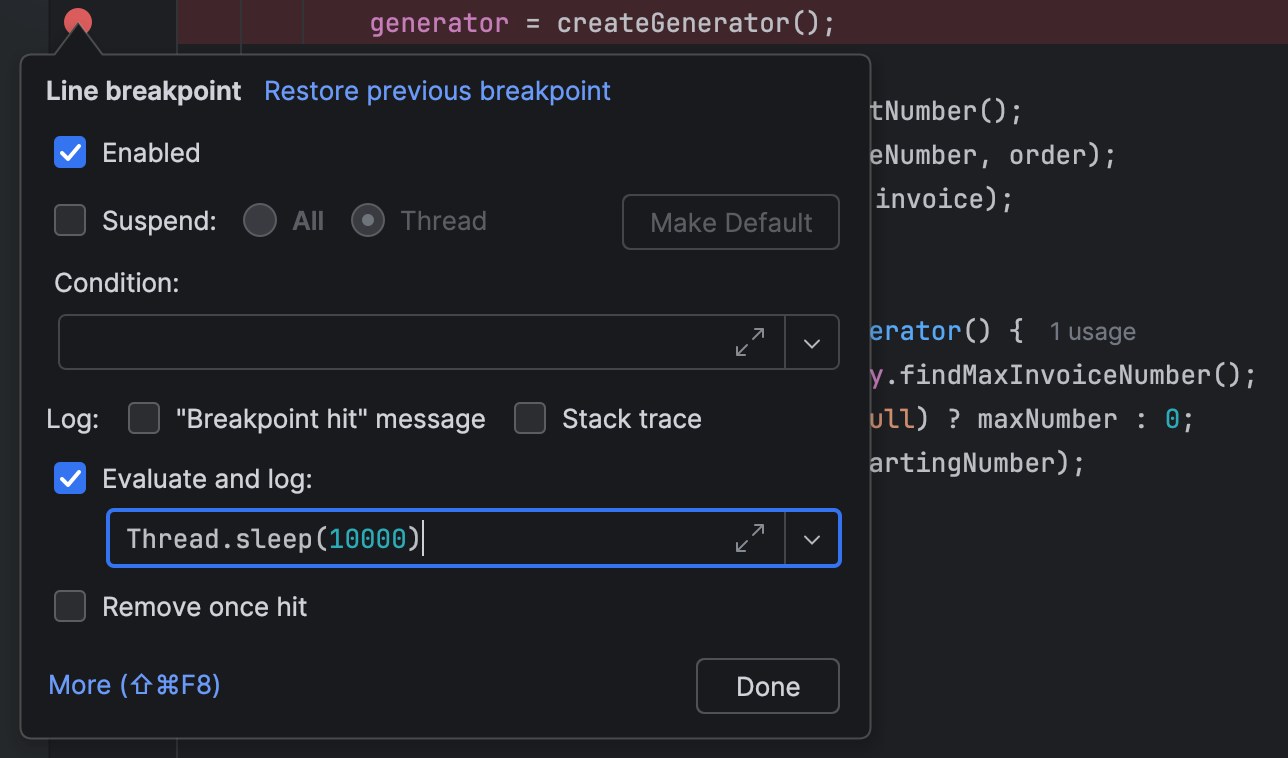
This type of breakpoint is designed for debug logging, but as we already know, it can be used for introducing pretty much any side effect. With this artificial delay, we don’t have to suspend the application because we have 10 extra seconds for the requests to collide.
Fixing the issue
There are several solutions to the problem depending on your requirements:
Option 1: Use the database
One of the ways to fix the issue is to let the database handle uniqueness:
@Service
public class InvoiceService {
    private final InvoiceRepository invoiceRepository;

    public InvoiceService(InvoiceRepository invoiceRepository) {
        this.invoiceRepository = invoiceRepository;
    }

    public Invoice createInvoice(Order order) {
        // Database generates the number via sequence or auto-increment
        return invoiceRepository.save(new Invoice(order));
    }
}
This solution completely removes the in-memory counter. The database ensures uniqueness even with multiple application instances.
Option 2: Eager initialization
If an in-memory generator is required, a correct approach is to make it a Spring bean:
@Component
public class InvoiceNumberGenerator {
    private final AtomicInteger counter;

    public InvoiceNumberGenerator(InvoiceRepository invoiceRepository) {
        Integer maxNumber = invoiceRepository.findMaxInvoiceNumber();
        int startingNumber = (maxNumber != null) ? maxNumber : 0;
        this.counter = new AtomicInteger(startingNumber);
    }

    public String nextNumber() {
        int next = counter.incrementAndGet();
        return String.format("INV-%05d", next);
    }
}@Service
public class InvoiceService {
private final InvoiceRepository invoiceRepository;
private final InvoiceNumberGenerator generator;
public InvoiceService(InvoiceRepository invoiceRepository,
InvoiceNumberGenerator generator) {
this.invoiceRepository = invoiceRepository;
this.generator = generator;
}
public Invoice createInvoice(Order order) {
String invoiceNumber = generator.nextNumber();
Invoice invoice = new Invoice(invoiceNumber, order);
return invoiceRepository.save(invoice);
}
}Since singleton beans are created at startup when only one thread is running, the initialization doesn’t have to be thread-safe. After that, the bean is correctly shared across all requests.
Option 3: Use @Lazy
If you really need lazy initialization
(for example, when a bean is expensive to create because it loads data or establishes connections),
you can use @Lazy to let Spring handle it safely:
@Component @Lazy
public class InvoiceNumberGenerator {
    private final AtomicInteger counter;

    public InvoiceNumberGenerator(InvoiceRepository invoiceRepository) {
        Integer maxNumber = invoiceRepository.findMaxInvoiceNumber();
        int startingNumber = (maxNumber != null) ? maxNumber : 0;
        this.counter = new AtomicInteger(startingNumber);
    }

    public String nextNumber() {
        int next = counter.incrementAndGet();
        return String.format("INV-%05d", next);
    }
}@Service
public class InvoiceService {
private final InvoiceRepository invoiceRepository;
private final InvoiceNumberGenerator generator;
public InvoiceService(InvoiceRepository invoiceRepository,
@Lazy InvoiceNumberGenerator generator) {
this.invoiceRepository = invoiceRepository;
this.generator = generator;
}
public Invoice createInvoice(Order order) {
String invoiceNumber = generator.nextNumber();
Invoice invoice = new Invoice(invoiceNumber, order);
return invoiceRepository.save(invoice);
}
}As a rule of thumb, if you find yourself manually implementing lazy initialization, caching, synchronization, or similar patterns, check if the framework already provides it. Doing it yourself often means fighting the framework and introducing maintenance overhead and bugs.
Summary
Even when we don’t explicitly create threads, our applications often run concurrently. This pattern isn’t unique to Spring or even web development. Anywhere you have an implicit threading model, you’re at risk: web frameworks, UI toolkits, and even standard library APIs all manage threads behind the scenes.
The next time you see intermittent, unexplainable behavior in your application, ask yourself: could this be a threading issue? Most often, the answer is yes.
Happy debugging!